
From prime step to OCI layer
Rockcraft is a tool that creates OCI images using the same concepts and mechanisms that create snaps and charms: the lifecycle language from Craft Parts. There is a significant difference between the way the Craft lifecycle works and the OCI specification, and one of Rockcraft’s jobs is to bridge the gap between these two worlds. This page describes how this is accomplished.
Note
It is not necessary to know these details to use the tool effectively, but they might illuminate some concepts and help understand why the contents of a given rock are the way they are.
Consider the following snippet of a project file that creates a rock containing a bare-bones Python 3.10 interpreter:
base: ubuntu@22.04

parts:
  python-part:
    plugin: nil
    stage-packages:
      - python3-minimal
This rock has Ubuntu 22.04 as its base and includes python3-minimal.
Conceptually, this means that at build time Craft Parts will pull in the
python3-minimal Ubuntu package and whatever dependencies it needs to work.
Indeed, if we run rockcraft prime --shell-after, we can see the final
contents ready to be packed in the prime directory - this is the directory
available at build-time through the ${CRAFT_PRIME} environment variable:
$ rockcraft prime --shell-after
$ cd ../prime
$ ls
bin  etc  lib  lib64  sbin  usr  var
$ ls usr/bin/
debconf               debconf-copydb          debconf-show  dpkg-divert              dpkg-realpath      dpkg-trigger  py3clean     python3
debconf-apt-progress  debconf-escape          dpkg          dpkg-maintscript-helper  dpkg-split         perl          py3compile   python3.10
debconf-communicate   debconf-set-selections  dpkg-deb      dpkg-query               dpkg-statoverride  perl5.34.0    py3versions  update-alternatives
As we can see, the prime directory has the contents of the python3-minimal
package but also many of its dependencies, direct and otherwise. Once the
lifecycle is finished, Rockcraft packs the contents of the prime directory as a
new OCI layer, directly as if the prime directory were the filesystem root
/.
Note
The following sections only apply to rocks with Ubuntu bases - bare rocks
don’t need prime pruning nor usrmerge handling.
Pruning the prime directory
One consequence of the inclusion of a stage-package’s
dependencies is that the prime directory ends up having many files that the base
Ubuntu layer already has. This can be seen, for example, by using a tool like
Dive:
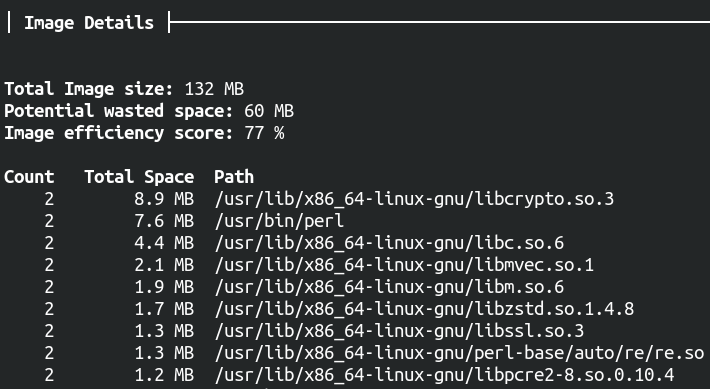
What dive tells us is that about 60 MB worth of files are duplicated
between the base Ubuntu 22.04 layer and the “primed” layer: for example, the
file /usr/lib/x86_64-linux-gnu/libcrypto.so.3 exists both in the base layer
(as part of the base Ubuntu system) and in the primed layer (pulled in by
belonging to a package that is an indirect dependency of python3-minimal).
Starting from version 1.1.0, Rockcraft “prunes” those files in the prime
directory that also exist, with the same contents, ownership and permissions, in
the base layer. The end res